
개발 기록이
[Claude] Claude Code 결제하기(Pro/Max 구독, API 크레딧) 본문
Claude Code로 레거시 코드를 수정해 보려다가, 초반에 결제 구조랑 사용 방식이 생각보다 헷갈려서 정리해 봤다.
1. 우선 터미널에서 아래와 같이 npm으로 설치를 진행한다.
npm install -g @anthropic-ai/claude-code
2. 프로젝트 폴더 경로에서 claude라고 입력한 후에 테마 선택을 해주고
Welcome to Claude Code v2.1.114
…………………………………………………………………………………………………………………………………………………………
     *                                       █████▓▓░
                                 *         ███▓░     ░░
            ░░░░░░                        ███▓░
    ░░░   ░░░░░░░░░░                      ███▓░
   ░░░░░░░░░░░░░░░░░░░    *                ██▓░░      ▓
                                             ░▓▓███▓▓░
 *                                 ░░░░
                                 ░░░░░░░░
                               ░░░░░░░░░░░░░░░░
       █████████                                        *
      ██▄█████▄██                        *
       █████████      *
…………………█ █   █ █………………………………………………………………………………………………………………
 Let's get started.
 Choose the text style that looks best with your terminal
 To change this later, run /theme
   1. Auto (match terminal)
 ❯ 2. Dark mode ✔
Welcome to Claude Code v2.1.114
…………………………………………………………………………………………………………………………………………………………
     *                                       █████▓▓░
                                 *         ███▓░     ░░
            ░░░░░░                        ███▓░
    ░░░   ░░░░░░░░░░                      ███▓░
   ░░░░░░░░░░░░░░░░░░░    *                ██▓░░      ▓
                                             ░▓▓███▓▓░
 *                                 ░░░░
                                 ░░░░░░░░
                               ░░░░░░░░░░░░░░░░
       █████████                                        *
      ██▄█████▄██                        *
       █████████      *
…………………█ █   █ █………………………………………………………………………………………………………………
 Let's get started.
 Choose the text style that looks best with your terminal
 To change this later, run /theme
   1. Auto (match terminal)
 ❯ 2. Dark mode ✔
   3. Light mode
   4. Dark mode (colorblind-friendly)
   5. Light mode (colorblind-friendly)
   6. Dark mode (ANSI colors only)
   7. Light mode (ANSI colors only)
 ╌╌╌╌╌╌╌╌╌╌╌╌╌╌╌╌╌╌╌╌╌╌╌╌╌╌╌╌╌╌╌╌╌╌╌╌╌╌╌╌╌╌╌╌╌╌╌╌╌╌╌╌╌╌╌╌╌╌╌╌╌╌╌╌╌╌╌╌╌╌╌╌╌╌╌╌╌╌╌╌╌╌╌╌╌╌╌╌╌╌╌╌╌╌╌╌╌╌╌╌╌╌╌╌╌╌╌╌╌╌
  1  function greet() {
  2 -  console.log("Hello, World!");
  2 +  console.log("Hello, Claude!");
  3  }
 ╌╌╌╌╌╌╌╌╌╌╌╌╌╌╌╌╌╌╌╌╌╌╌╌╌╌╌╌╌╌╌╌╌╌╌╌╌╌╌╌╌╌╌╌╌╌╌╌╌╌╌╌╌╌╌╌╌╌╌╌╌╌╌╌╌╌╌╌╌╌╌╌╌╌╌╌╌╌╌╌╌╌╌╌╌╌╌╌╌╌╌╌╌╌╌╌╌╌╌╌╌╌╌╌╌╌╌╌╌╌
  Syntax theme: Monokai Extended (ctrl+t to disable)
3. 로그인 방법을 고르는 화면이 나온다.
- 1번 - Claude account with subscription: claude.ai Pro/Max 구독이 있으면 이걸 선택. API 키 없이 구독으로 Claude Code를 쓸 수 있다.
- 2번 - Anthropic Console account: API 크레딧 충전 방식. 쓴 만큼 차감되는 종량제.
Claude Code can be used with your Claude subscription or billed based on API usage through your Console account.
 Select login method:
   1. Claude account with subscription · Pro, Max, Team, or Enterprise
 ❯ 2. Anthropic Console account · API usage billing
   3. 3rd-party platform · Amazon Bedrock, Microsoft Foundry, or Vertex AI
2번을 선택한 후에도 계속 에러가 뜨면서 명령어가 적용되지 않는데
Credit balance too low · Add funds:
https://platform.claude.com/settings/billing
https://platform.claude.com/settings/billing 페이지로 이동하면 아래와 같은 화면이 뜬다.
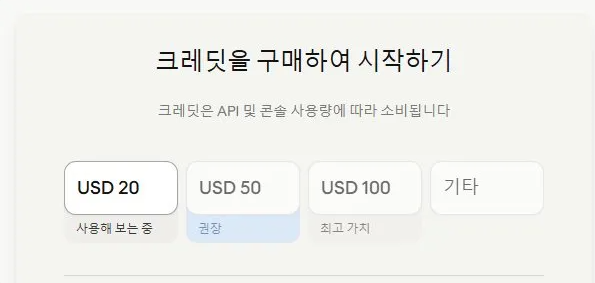
이건 요금제가 아니라 선불 크레딧 충전 금액을 고르는 화면이다.
결제를 진행한 후에도 Claude Code(클로드 CLI)는 세션 기반 로그인을 쓰는 경우가 많아서 로그인 안 되어 있으면 401에러가 발생한다고 한다.
Please run /login · API Error: 401 {"type":"error","error":{"type":"authentication_error","message":"Invalid authentication credentials"},"request_id":"에러코드"}
그래서 터미널에서 /login 입력한 후 로그인만 해주면, 그다음부터는 원하는 명령을 바로 사용할 수 있다.
claude.ai 구독(Pro/Max)과 API 크레딧 차이가 뭘까?
1. claude.ai 구독 (자동 결제)
- Claude 채팅 서비스
- 매달 자동 결제 + 사용량 리셋
- Claude Code도 사용 가능하지만 채팅과 동일한 사용량 제한을 공유한다
2. API 크레딧 (충전식)
- 개발자용 API
- 선불 충전, 쓴 만큼 차감
- 자동 결제 없음. 다 쓰면 다시 충전
+ 결제 방법 (API 크레딧 기준)
- console.anthropic.com 접속 → 로그인
- Billing → 카드 등록 → 크레딧 충전 ($20부터, 신규 $5 무료 🚨충전 후에 추가로 주는 크레딧이지 결제할 때 $15 로 할인해주는건 아님🥲)
- 프로젝트 폴더에서 claude 실행
- /login으로 로그인하면 바로 사용 가능
정리
- claude.ai 구독 = OTT처럼 매달 자동 결제
- API 크레딧 = 교통카드처럼 미리 충전해서 쓴 만큼 차감
- claude ai, claude 같은 계정으로 로그인 가능
- 대신 결제 방식이 분리되어 있음
claude.ai 구독과 API 크레딧은 같은 계정을 쓰지만, 과금 방식이 따로 운영된다. 처음 시작해 보는 경우라면 가볍게는 API 크레딧으로 시작하는 게 더 편할 것 같다.
그래서 API 크레딧으로 계속 써보면서, 실제로 코드 작업에 어느 정도까지 활용할 수 있을지 더 써볼 생각이다☺️